
The Browser App
The Browser App can be accessed by clicking on the Tools menu and View Apps.
This application provides a fully integrated web browser integrated with your Workspace file system, allowing you to open and view local files in the same way as a standard web browser. HTML files can be rendered directly within the browser, making it easy to review locally stored web content.
The Browser App allows you to access web-based applications and services without the need for a virtual machine. The Browser App can be used to access applications with web-based user interfaces such as XNAT, Gitea, High Performance Computing (HPC) environments, Azure management portals and other approved web services.
Downloads made through the Browser App are saved to your Workspace files area and remain available across sessions. Browser data, including bookmarks and cookies, is also retained between sessions, allowing you to continue working with your saved websites and authenticated applications when you return to the Workspace.
Access to websites and services outside of the Workspace is controlled through the Workspace allow list. Only approved external domains can be accessed from the Browser App.
Tenant Administrators can modify the allowed domains list from the workspace. This allows additional approved domains to be added beyond the default allow list available to the workspace.
Opening HTML files
Files with the extensions .html and .htm can be opened directly in the Browser App.
- Selecting an HTML file from the file list will open the file in the Browser App.
- The file action menu includes an Open as text option, allowing you to edit the HTML source in the Workspace editor instead of rendering it in the browser.
Using the Browser App
The Browser App provides an individual browser session for each user. Your bookmarks, cookies and browser preferences are preserved between sessions, allowing you to maintain a consistent browsing experience across multiple uses of the application.
The default download location within the Browser App is your Workspace files area, making downloaded files available alongside your other Workspace content.
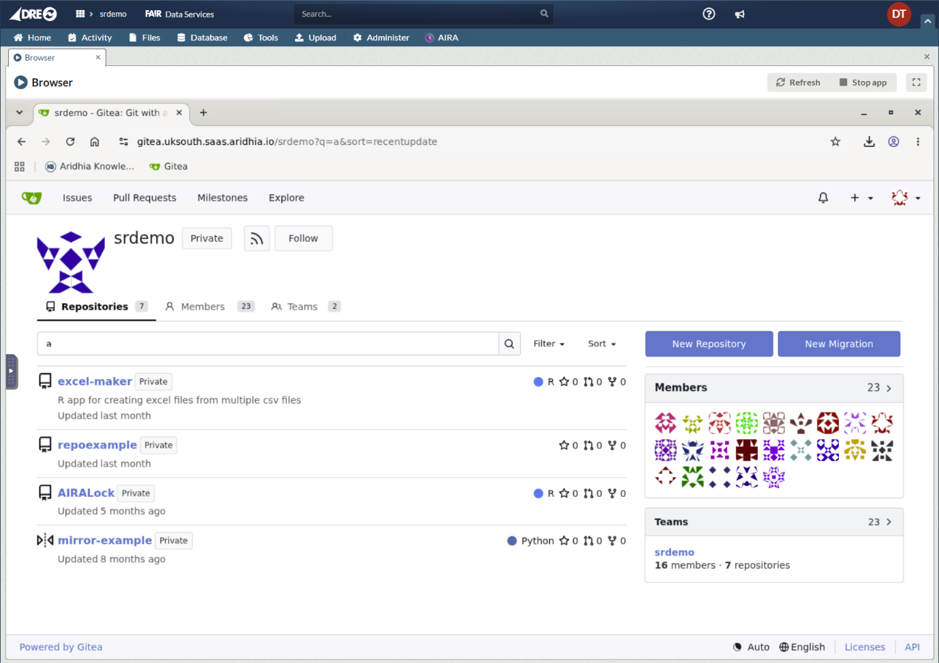
An example of the Browser App accessing the Workspaces Gitea service:
For pasting from external sources please follow the instructions here: Copy and paste into an app
For information about starting and managing Apps within a Workspace, see the Navigating the App tab article.